Thursday, November 26th, 2009
I’ve been evaluating Photo to Movie from LQ Graphics as a tool for digital storytelling. My favourite application is iMovie HD. It’s not perfect but better the devil you know – and I know iMovie pretty well now and still discover tricks that make me think “how clever”.
When Apple rewrote iMovie for iLife 08 it presented a host of problems for digital storytellers. The most obvious one is the total lack of a timeline in the conventional video editing style. It can be pressed into use for digital storytelling but for a new user there is a serious lack mouse functions for stills. Almost all of the digital stories told in my workshops are told by beginners using still images. Things improved in iLife 09 but not enough for me to start using it over the HD version.

Building Affected for Life? in Photo to Movie
Last month someone alerted me to Photo to Movie. A package written specifically for still images. It has a timeline and is capable of creating something more sophisticated than a simple slideshow by the use of highly configurable zoom and pan functions. It integrates quite well with iTunes and iPhoto, and so things looked hopeful as I read the help files and absorbed the basic functions. There are also Mac and Windows versions. But would it live up to my hopes? (more…)
Tags: "photo to movie", application, digitalstorytelling, editing, evaluate, iLife, images, iMovie, keyframes, movie, photo, review, Software, timeline, transitions, workshop, zoom
Posted in Opinion, Resources, Software, Tips, Tutorial | 1 Comment »
Monday, May 18th, 2009
Some thoughts on things I’ve seen for May 17th from 13:55 to 13:55:
Tags: Apple, iMovie, telling, video
Posted in Journal | No Comments »
Tuesday, March 3rd, 2009
This a rather techy article from Macworld but it is very useful. The quality of exported video from iMovie is often disappointing for a number of reasons. This article tackles only one format, 720 line HD, but the principles can be applied to others too. It’s well worth a read. If you understand it, fine. If not you may need a more elementary lesson in video formats.
Tags: formats, iMovie, video
Posted in Software, Tips, Tutorial | 1 Comment »
Wednesday, January 28th, 2009
The new iMovie ‘09 appears to have the same serious limitation on using stills as the previous version. Drag a still into the project and it’s duration is set by default to 4 seconds. In any other video editing software changing the duration is just a matter of dragging the end of the clip to the right place on the timeline. In the new iMovie you have to click on a tiny icon and enter the duration from the keyboard in seconds (no frames as in iMovie 6 HD). A matter of trial and error in equal quantities.
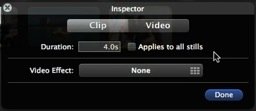
I found out about this from the Apple iMovie ‘09 tutorial so I have posted a question on the iMovie ‘09 discussion on the Apple Site to see if anyone had discovered a workaround. In the meantime I’ll be using version 6 HD, which I am assured does work after iLife ‘09 has been installed.
Tags: Apple, iMovie
Posted in Opinion, Software, Tips, Tutorial | 1 Comment »
Tuesday, January 27th, 2009
iLife ‘09 was released today. It was also the day that the free download page for iMovie HD 6 was removed.
Apple allowed users to download the earlier version because iMovie 08 was such a radical change that many users were left without some essential functions – timeline editing to name just one.
I can only assume that because iMovie ‘09 has more functions Apple thinks that the old application is no longer needed. What they will have failed to take into account is the way that Digital Storytellers use iMovie using a narrated voice track and still images compiled on a timeline. Even if ‘09 is capable it will take time for workshop leaders like myself to devise new workflows and update their user manuals.
It seems that iMovie HD is still on the Apple Support servers and can be downloaded by following this link. iMovie HD So get your copy now and keep it somewhere safe. You may still need it for a while yet – you may even prefer it.
Story first seen on MacRumours.com
Tags: Apple, iMovie, Software
Posted in News, Resources, Software, Tips | No Comments »